
Blue Fruit Theme GO Launcher1.0 - Get APK
You'll be able to download in few seconds.
Publisher Description
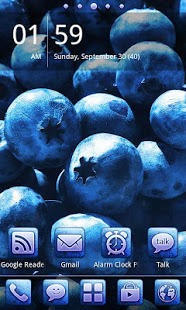
Blue Fruit Theme
needs GO Launcher EX
to be installed on your phone. It's a free launcher application available here on Google Play.
If the theme does not show up in the theme gallery, please contact us at etherealdesignde@gmail.com.
It is recommended to use big icons. You can apply them by selecting Menu>Preferences>Visual settings>Icons>Icon size>Recommended size(big)
The theme contains all wallpapers in two resolutions since GO Launcher EX does not resize a high resolution wallpaper to small screens. Therefore one is 960x800 and other one is 1440x1280. The latter is indicated as "HD" in the wallpaper selection.
[Theme Description]
Blue Fruit Theme for GO Launcher EX is a vibrant blue fruity theme filled with stunning wallpapers of blueberries, grapes and plums.
[How to apply the theme]
1. Either open the app right after the installation
2. Or select Menu>Themes>Installed>Blue Fruit Theme>Apply
[The theme contains the following]
-6 stunning blue fruity wallpapers
-26 delicious blue app icons:
adobe reader
alarm clock plus
astro
compass
dolphin hd
dolphin mini
dropbox
es file explorer
evernote
facebook
facebook messenger
gtasks
kakaotalk
kik
last.fm
layar
opera
opera mini
pulse
quickpic
skype
stopwatch & timer
twitter
whatsapp
winamp
zedge
-29 delicious blue common icons:
browser
calculator
calendar
camera
clock
contacts
dialer
downloads
email
file manager
fm radio
gallery
gmail
google maps
google reader
google search
google translate
google goggles
google drive
gtalk
play store
messaging
music
navigation
places
settings
sound recorder
video player
youtube
[Tips]
-If you like the theme, make sure to check out the other color variations
-The clock widget on the preview image is SiMi Clock Widget.
-If you want a soft shadow on the icon labels instead of the default near-opaque box go to Menu>Preferences>Screen settings>App icon labels and select "Show labels" instead of "Show with background".
-You can change the look of any icon (including the app drawer icon) by long-pressing the icon and selecting "replace". (this only works on the home screen)
Feel free to contact us at etherealdesignde@gmail.com.
About Blue Fruit Theme GO Launcher
The company that develops Blue Fruit Theme GO Launcher is Ethereal Design. The latest version released by its developer is 1.0.
To install Blue Fruit Theme GO Launcher on your Android device, just click the green Continue To App button above to start the installation process. The app is listed on our website since 2013-06-03 and was downloaded 0 times. We have already checked if the download link is safe, however for your own protection we recommend that you scan the downloaded app with your antivirus. Your antivirus may detect the Blue Fruit Theme GO Launcher as malware as malware if the download link to com.gau.go.launcherex.theme.com.etherealdesign.bluefruits is broken.
How to install Blue Fruit Theme GO Launcher on your Android device:
- Click on the Continue To App button on our website. This will redirect you to Google Play.
- Once the Blue Fruit Theme GO Launcher is shown in the Google Play listing of your Android device, you can start its download and installation. Tap on the Install button located below the search bar and to the right of the app icon.
- A pop-up window with the permissions required by Blue Fruit Theme GO Launcher will be shown. Click on Accept to continue the process.
- Blue Fruit Theme GO Launcher will be downloaded onto your device, displaying a progress. Once the download completes, the installation will start and you'll get a notification after the installation is finished.
Program Details
System requirements
Download information
Pricing
Version History
version 1.0
posted on 2013-06-03
version 1.0
posted on 2013-06-03
Several fixes and updates
Disclaimer
External Download
We do not host Blue Fruit Theme GO Launcher on our servers. We did not scan it for viruses, adware, spyware or other type of malware. This app is hosted by Galad and passed their terms and conditions to be listed there. We recommend caution when installing it.
The APK Download link for Blue Fruit Theme GO Launcher is provided to you by apps112.com without any warranties, representations or guarantees of any kind, so access it at your own risk.
If you have questions regarding this particular app contact the publisher directly. For questions about the functionalities of apps112.com contact us.
